
Privacy-first WordPress analytics
Analytics that tell you the truth
Every visit stays in your own database. Every number is measured honestly — engaged time that counts the last page of a visit, and bot traffic caught by how it behaves, not just what it claims to be. And when you want answers, just ask — with Pro.
Three things nobody else gives you together
Private by design
All tracking and reporting happens on your own server — no third-party services, no data leaving your site, no IP addresses stored. Works with consent managers, honours Do Not Track, and keeps year-on-year history even after pruning.
Honestly measured
Real engaged time — counted only while the page is actually being used, and including the last page of a visit, which pageview-gap tools count as zero. Idle tabs and bot-held pages don’t accrue a second, and suspected bots get flagged. Play counts that are a floor, never an estimate. Funnels that show real figures. Numbers you can act on.
Ask it anything Pro
The built-in AI assistant answers questions about your stats in plain English — “what changed this month, and why?” — fetching whichever reports it needs. Bring your own Claude, ChatGPT or Gemini key; only aggregate statistics are shared unless you explicitly opt in to per-visitor answers.
Ask AI Pro
Your analytics, with answers
Stop hunting through reports. Ask a question in plain English and the built-in assistant fetches whichever reports it needs — comparing periods, combining sources, and telling you what changed and why.
Bring your own Claude, ChatGPT or Gemini key. Keys are encrypted at rest, it shares aggregate statistics by default (per-visitor answers are a separate opt-in), and it strictly answers questions about your stats — nothing else.
Which products earned the most last month, and which sources drove those sales?
Your top earner was My Product — £3,210 across 31 orders, up 18% on the previous month.
- Organic search drove 44% of that revenue
- Direct 31%, email campaigns 17%
- Most buyers landed on your product review post first
Worth noting: checkout drop-off fell to 38% after your shipping change.
Every report you need
From first visit to final sale
- Visitors, sessions and journeys — one consistent visitor identity across every report, one click to any visitor’s full story.
- WooCommerce Pro — revenue, products, checkout funnel with true abandonment, and multi-touch conversion paths.
- Media plays Pro — SoundCloud and YouTube plays with real track titles. Built for music and content sites.
- Core Web Vitals Pro — a PageSpeed-style pass/fail verdict from your real visitors.
- Email reports — the Monday-morning summary, delivered to your inbox.
- Spike alerts Pro — a heads-up when a post takes off.

The honest-numbers difference
A visitor reads your best article for 10 minutes, then leaves
Pageview-gap analytics
0:00
No next page load to measure against — the last page of every visit counts as zero.
GreenOrb Statistics
9:47
Real engaged time, measured while the page is open, visible and actively being used — idle and bot-held tabs don’t count.
Single-page visits and final pages are where your most engaged readers live — and where most tools record nothing. How we measure it →
Bot defence
Bots can visit. They can’t pollute.
Modern junk traffic doesn’t announce itself. It runs a real Chrome browser, rotates through clean VPN and datacenter IPs, and fakes a Google referrer — and most analytics tools count it as your most engaged reader. User-agent filters catch the bots that admit it. GreenOrb Statistics also catches the ones that don’t.
Caught by behaviour
A daily scan flags impostors by the one thing they can’t fake: being a reader. Many sessions, a single page, and not one scroll, click or play across all of them earns a 🤖 badge — automatically, no setup.
No fake reading time
Engaged time only counts while a page is genuinely being used, so an automated browser parked on your article banks nothing. Your averages defend themselves before you even log in.
Two-click cleanup
You hold the verdict. Pardon a false positive forever — or erase a bot’s entire history and watch your past totals recalculate as if it had never visited. Optionally block it from ever being counted again.
Flag-only by default — nothing leaves your statistics without your say-so. How bot defence works →

Trends at a glance
Every number, against last period
- Period-over-period everywhere — every card and chart compares against the previous period, so “is this good?” answers itself.
- Year-on-year that survives pruning — monthly totals are kept forever, even after old raw data is cleaned up.
- Customise every page — drag panels, hide what you don’t use; each report remembers your layout.
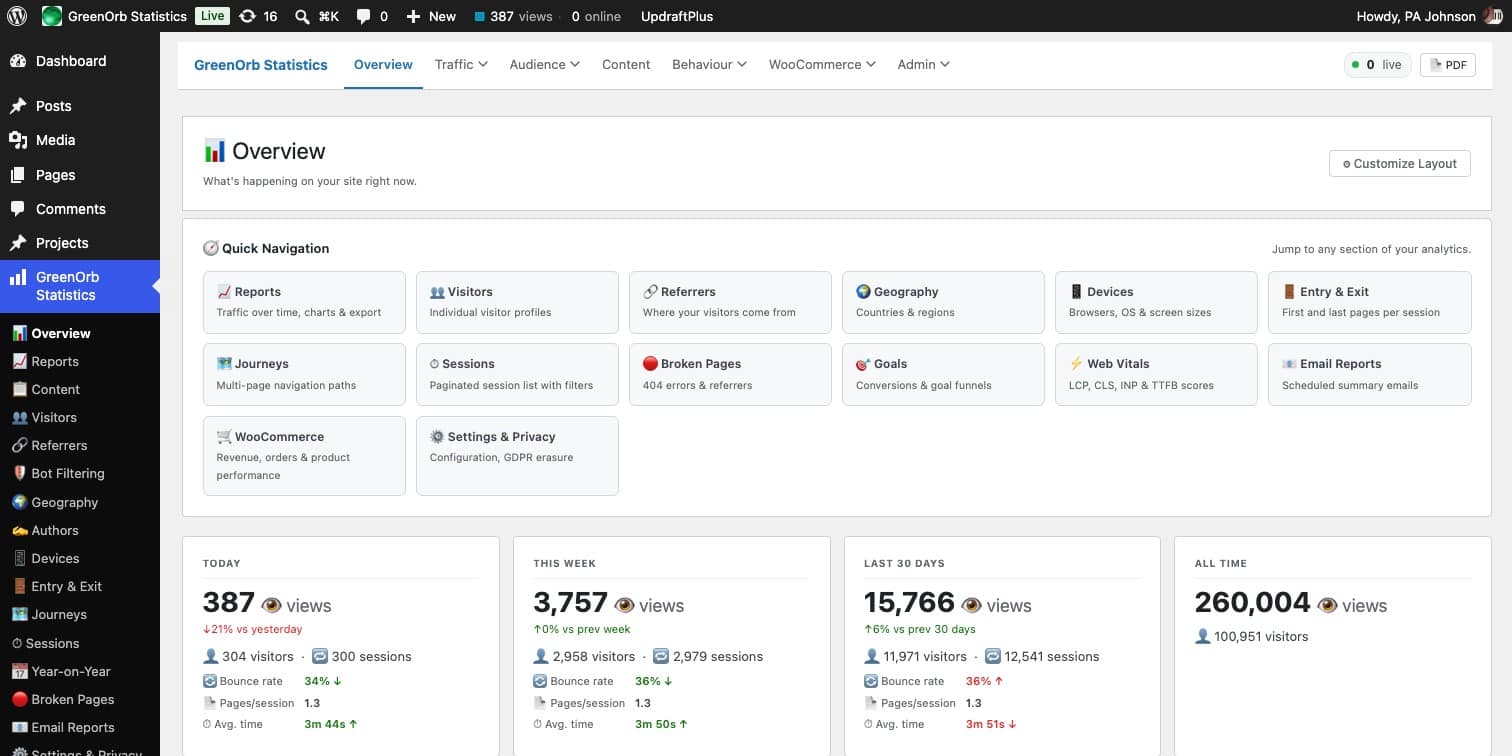
- Take it with you — CSV export on the key reports, PDF export of the overview.
Click tracking
The buttons, not just the pages
Page views tell you where someone went. They do not tell you what they pressed when they got there — the download, the pricing toggle, the “book a call” that matters more than the page around it.
- No code required — put
data-greenorb-track="Free trial"on any element and it counts. Prefer to leave your markup alone? List a CSS selector under Settings → Tracking instead. - Any element, not just links — buttons, tabs, accordions, the image people keep clicking. If it is on the page, it can be counted.
- Totals, and the people behind them — every click lands in the 👆 Top Tracked Clicks panel on your Reports screen, and against the visitor who made it, so you can open their full journey and see what they did next.
- One enthusiast, or a hundred customers — clicks and distinct visitors are counted side by side, so you can tell which one you are looking at.
- Counted honestly — a rage-click does not become five. A repeat on the same element within a second is ignored, while a deliberate second press later still counts. Only the element’s label is stored, never what anyone typed into a form.
Included free — like everything on this page that is not marked Pro.
Watch it in action
Four short tutorials, about three minutes each. The videos load from YouTube when you press play. See the channel →


Every feature, one honest plugin
Everything below is included free unless marked Pro — and Pro is one upgrade with everything in it. See pricing →
👥 Visitors & sessions
One identity across every report
🧭 Journeys & entry/exit
The paths visitors actually take
🔗 Referrers & UTM
Search, social, AI and campaigns
🌍 Geography
World map, countries and cities
💻 Devices
Type, browser and OS
✍️ Author analytics
Multi-author performance
📅 Year-on-Year
History that survives pruning
📬 Email reports
A summary in your inbox
🔎 Broken pages
404s with their referrers
🖱️ Click tracking
Any button or link, no code
🛡️ Privacy suite
Consent, DNT & GPC, retention, erasure
⬇️ CSV & PDF export
Take your data anywhere
🧩 Events API
Outbound, downloads, custom events
🤖 Bot defence
Behavioural flagging, two-click cleanup
🛒 WooCommerce Pro
Revenue, funnel and conversion paths
🤖 Ask AI + MCP Pro
Plain-English answers from your stats
🎯 Goals & conversions Pro
With multi-touch conversion paths
📈 Spike alerts Pro
Know when a post takes off
⚡ Web Vitals Pro
Pass/fail from real visitors
🔀 SPA tracking Pro
Single-page-app navigation
🎵 Media plays Pro
SoundCloud and YouTube, with titles
📝 Form tracking Pro
CF7, WPForms, Gravity, Elementor, Divi
🗺️ Excluded countries Pro
Leave chosen countries out of your stats
Up and running in under a minute
Install, activate, and a short setup wizard walks you through privacy choices, email reports and geography. Tracking starts immediately — with sensible defaults if you skip everything.
Private for you and your visitors
The privacy checklist, in full
- IP addresses are never stored — used for a location lookup, then discarded
- No third-party services — nothing sent to any external server
- Consent-manager integration — works with Complianz and the WP Consent API
- Do Not Track honoured — out of the box
- Configurable retention — with permanent monthly rollups for year-on-year
- Your data stays yours — export to CSV any time, delete on uninstall if you choose
Your stats. Your server. The whole story.
Free on WordPress.org. No account, no API keys, no data leaving your site.