

You installed Google Analytics because everyone said you should. Then came the cookie banner. Then the consent rules. Then a dashboard so crowded that answering “how many people read my post yesterday?” took five clicks and a fresh cup of tea.
There’s nothing wrong with Google Analytics. It’s free, it’s powerful, and for some businesses it’s exactly the right tool. But if all you want is to understand your own visitors, without sending their visits to Google, there’s a simpler route: an analytics plugin that keeps everything inside your own WordPress site.
This guide looks at six Google Analytics alternatives built for WordPress. One thing first: I make one of these plugins, GreenOrb Statistics. I’ve described the other five using what each one says about itself on its own WordPress.org page and website, checked on 3 October 2026, and the links to every source are at the end.
🧭 What to look for in Google Analytics alternatives
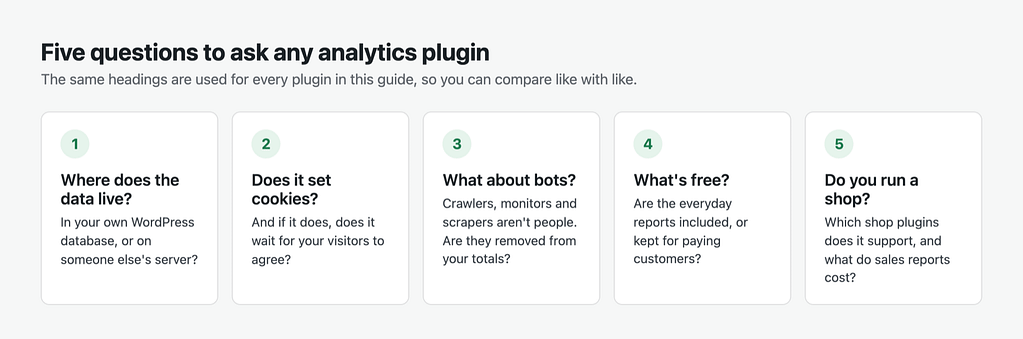
Before the list, five questions worth asking of any analytics tool. They’re the headings used for every plugin below, so you can compare like with like.
- Where does the data live? In your own WordPress database, or on someone else’s server?
- Does it set cookies? And if it does, does it wait for your visitors to agree?
- What does it do about bots? A lot of what reaches a website isn’t a person at all: search engine crawlers, uptime monitors, scrapers.
- What’s free? Some plugins give you the everyday reports for nothing. Others keep them for paying customers.
- Do you run a shop? If so, check which shop plugins it supports and what the sales reports cost.
1. 🟢 GreenOrb Statistics
I built GreenOrb Statistics because I couldn’t tell how much of my own traffic was real. Think of it as an itemised receipt for your visitors: it shows what it counted, what it removed, and why.
- Data: stored in your own WordPress database. Reports load without calling any outside analytics service.
- Cookies: one first-party cookie recognises returning visitors, and it waits for statistics consent when your cookie banner is connected through the free WP Consent API plugin. You can switch it off and run with zero cookies.
- Bots: filtered, flagged and itemised. Known bots and automated browsers are filtered out, a daily scan flags visitors that behave like bots for you to review, and a filtered-traffic receipt shows what was taken out.
- Free: live visitors, UTM campaign tracking, click tracking, visitor journeys, scheduled email reports, 404 errors and on-site search terms.
- Pro (from $49 a year): WooCommerce reports, goals, form tracking, Core Web Vitals, and Ask AI, which answers questions about your traffic in plain English using your own Claude, ChatGPT or Gemini key.
A good fit if you want to know what your traffic is actually made of, or you’d like to ask questions of your stats rather than dig through reports. See what GreenOrb Statistics does.
2. Independent Analytics
A clean, well-designed dashboard that’s quick to find your way around.
- Data: stored in your WordPress database, with no communication with outside servers.
- Cookies: none.
- Bots: ignores bots that identify themselves, such as search engine crawlers and uptime checkers. For malicious bots it recommends Cloudflare or Wordfence.
- Free: pages, referrers, geographic and device reports, CSV and PDF export, saved reports, and shared access for other users.
- Pro: UTM campaign tracking, real-time analytics, click tracking, eCommerce sales tracking, user journeys and form tracking.
A good fit if you like saving your own report views and filtering tables, or you sell through a shop plugin other than WooCommerce, as its eCommerce reports cover several. I’ve written a full comparison of GreenOrb Statistics and Independent Analytics if you’re choosing between the two.
3. WP Statistics
A long-established analytics plugin with a large community behind it.
- Data: created and stored entirely on your own server.
- Cookies: none.
- Bots: says it filters out bot visits using established techniques.
- Free: visitors, bounce rate, content and category reports, referrers, geography, devices and author analytics. It also integrates with the WP Consent API and has tools to export and delete data.
- Paid: premium add-ons such as Data Plus, Marketing and Advanced Reporting, sold separately or together as WP Statistics Premium.
A good fit if you want a mature plugin with a long track record, and you’d rather pick individual add-ons than buy one bundle.
4. Burst Statistics
Generous with its free version, particularly if you want goals.
- Data: stored in your own WordPress database.
- Cookies: a first-party cookie by default, with a cookieless mode you can switch on.
- Bots: its WordPress.org page notes that Google’s crawlers are recognised as bots and not tracked.
- Free: visitors, pageviews, referrers, top content, devices, goal tracking, email reports and real-time stats.
- Pro: plans add UTM tracking, geography and advanced filters, then WooCommerce sales reports, then client reporting for agencies.
A good fit if you want goals and email reports without paying, and like the option of cookieless tracking.
5. Koko Analytics
A deliberately small plugin. If you want a simple answer to “what’s popular?” and nothing more, it’s a good place to start.
- Data: stored on your own site. It says it doesn’t process personal data, and nothing is shared with third parties.
- Cookies: optional. It can recognise returning visitors without them.
- Bots: filters bots using bot lists.
- Free: top pages and referrers, returning visitors, exclusions by user role or IP address, imports from other analytics tools, automatic clean-up of old data, a popular posts widget and a pageview counter.
- Pro: country and technology reports, email reports, UTM campaigns, custom events and traffic spike alerts.
A good fit if you want something small, quick and low-maintenance.
6. Matomo for WordPress
Matomo is a full analytics platform, and this plugin runs it inside your WordPress site.
- Data: stored in your WordPress database and not sent to any third party. Very busy sites can connect to a separate Matomo server instead.
- Cookies: sets cookies by default, with a “Disable cookies” setting to turn them off.
- Bots: its WordPress.org page doesn’t say, so I’ve left this one blank rather than guess.
- Free: the core Matomo analytics, plus a GDPR manager, IP anonymisation, an opt-out shortcode and data retention settings.
- Paid: premium plugins such as heatmaps, session recordings, funnels and form analytics.
A good fit if you want something similar in scope to Google Analytics, and don’t mind a busier interface to get it.
📊 At a glance
| Plugin | Data stored | Cookies | Paid version |
|---|---|---|---|
| GreenOrb Statistics | Your WordPress database | One, after consent; can run with none | Pro, from $49 a year |
| Independent Analytics | Your WordPress database | None | Pro |
| WP Statistics | Your server | None | Add-ons or Premium bundle |
| Burst Statistics | Your WordPress database | One by default; cookieless mode available | Pro plans |
| Koko Analytics | Your site | Optional | Pro |
| Matomo for WordPress | Your WordPress database | By default; can be switched off | Premium plugins |
All six have a free version on WordPress.org. Paid prices change, so check each plugin’s own pricing page for the current figures.
👉 Which one should you choose?
There’s no single winner. It depends on what you need to know.
- You want it simple. Koko Analytics, or the free version of Independent Analytics.
- You want depth. Matomo for WordPress, a full analytics platform similar in scope to Google Analytics.
- You want a long track record. WP Statistics.
- You run a WooCommerce shop. Independent Analytics Pro, Burst Statistics and GreenOrb Statistics Pro all report sales. Independent Analytics also covers several other shop plugins.
- You want to see what your traffic is made of. GreenOrb Statistics shows the bots it removed and the visitors it suspects, and Pro lets you ask questions in plain English.
Every one of them is free to try. Install one, give it a week, and see whether its numbers answer your questions. If not, try another. Your data stays on your site either way.
❓ Frequently asked questions
Do I still need a cookie banner?
It depends on everything your site uses, not just analytics. If none of your plugins, embeds or fonts set non-essential cookies, you may not need one. If anything does, you will. Your cookie consent plugin can scan your site and tell you what it finds.
Can I run one of these alongside Google Analytics?
Yes. Many people do while they compare. Just remember that each one counts slightly differently, so the totals won’t match.
Why don’t the numbers match Google Analytics?
Every tool counts differently: what it treats as a bot, how it spots a returning visitor, and how ad blockers affect it. A plugin that removes more bots will usually show fewer visits, and that’s often closer to the truth.
Are these plugins really free?
All six have a free version on WordPress.org that you can use without paying. Their paid versions add extra reports or features.
Does keeping data on my own server make my site GDPR compliant?
It helps, because visitor data doesn’t leave your site, but no plugin makes you compliant on its own. You’re still responsible for your privacy policy, consent where it’s needed, and how long you keep data.
Sources
Checked on 3 October 2026.
- GreenOrb Statistics on WordPress.org and its documentation
- Independent Analytics on WordPress.org and its bot policy
- WP Statistics on WordPress.org
- Burst Statistics on WordPress.org and its cookieless tracking page
- Koko Analytics on WordPress.org
- Matomo for WordPress on WordPress.org and Matomo’s guide to going cookieless



0 Comments