
Divi 5 has been out of beta since 26 February 2026. If your site still runs Divi 4, you will have seen the option to enable Divi 5 updates in the Divi dashboard, and you may be wondering whether to use it.
Staying on Divi 4 for now is a sensible choice. Nothing is broken, and Elegant Themes is still fixing it. The question has changed from “is Divi 5 ready?” to “when is the right moment for my site?”
⚡ The short answer
- Divi 5 is the current, stable version of Divi. It left beta on 26 February 2026 and the latest release, 5.14, arrived at the end of September with 97 fixes and improvements.
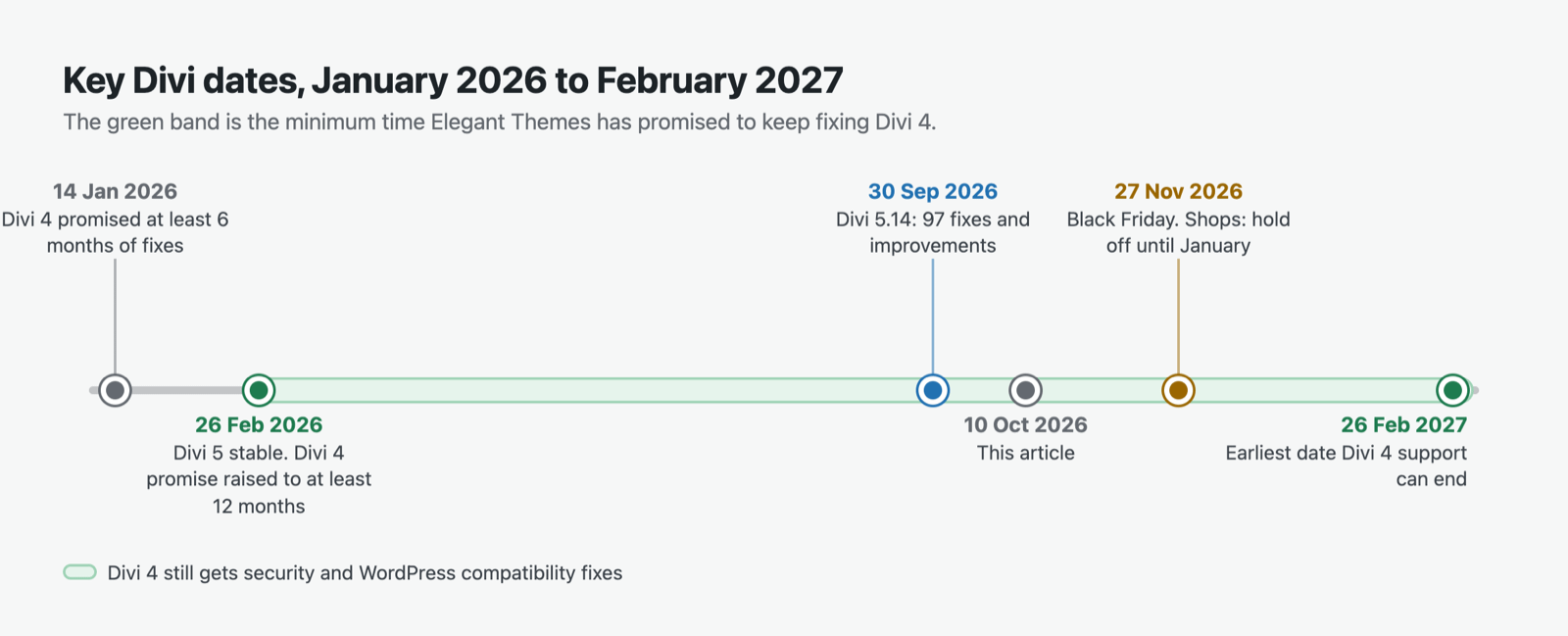
- Divi 4 is supported until at least 26 February 2027. Elegant Themes promises security and WordPress compatibility fixes for at least 12 months after launch, “and longer if practical”. No new features.
- The upgrade is free for anyone with a Divi membership, yearly or lifetime.
- Move now if your site uses Divi’s own modules and you can test on a staging copy first.
- Wait a little if you rely on third-party Divi modules that aren’t marked as Divi 5 compatible yet, or if you run a shop heading into Black Friday and Christmas.
- Don’t leave it to February. Plan your move for this winter, so you have weeks of slack before the support floor.
📅 Where Divi 5 stands in October 2026
In the builder, Divi 5 looks broadly like Divi 4, but most of what sits underneath has been rebuilt. Divi 4 stored your layouts as shortcodes. Divi 5 stores them in WordPress’s own block format, on a new framework.
That rebuild went through a long public alpha and beta. Some of you will remember the alpha updates back in 2024. Since the stable release, Elegant Themes has kept up a steady run of point releases. Version 5.13 in mid-September let third-party plugins add their own icon fonts. Version 5.14, announced on 30 September, brought new AI models, slider and form improvements, and several security fixes. The same post says Components and Slots are next.
It is still moving fast. Elegant Themes’ own migration guide says Divi 5 is still in active development and warns that occasional bugs are expected. That’s normal for software this young. It’s also the main reason to test on a copy before you switch.
⏳ How long Divi 4 will be looked after
The support window has grown since the first announcement.
| When | What Elegant Themes said |
|---|---|
| 14 January 2026 | Divi 4 supported for at least six months after Divi 5’s release |
| 26 February 2026 (launch day) | Divi 4 supported for at least 12 months, “and longer if practical” |
So the floor is now 26 February 2027. Until then, Divi 4 sites can stay on the Divi 4 update path and get security patches and fixes for new WordPress versions. What they won’t get is anything new. Every new feature lands in Divi 5 only.
Elegant Themes also says Divi 4 will eventually reach end-of-life, with the timing tied to how stable Divi 5 becomes.
✨ What you get when you move to Divi 5
Most of the new features fix things you’ve worked around for years. A few of the ones I’d look at first:
- Design Variables. Set your brand colours, fonts, sizes and spacing once, then use them everywhere. Change a variable and every module that uses it updates. If you’ve ever hunted through 40 pages to change one shade of green, this one is for you.
- Design Presets. Class-based style presets. Change one and every module using it updates across the site.
- Loop Builder. Repeat a layout for each post, product or custom field entry, with a Query Builder to filter what shows. It works with Advanced Custom Fields, including repeater fields, which used to mean a third-party module or custom code. I wrote about using Advanced Custom Fields with Divi when this took real effort.
- Flexbox and a CSS Grid editor. Modern layout controls instead of fixed rows and columns.
- Seven adjustable breakpoints. Divi 4 gave you desktop, tablet and phone. Divi 5 lets you design for the sizes your visitors actually use.
- Interactions and Canvases. Build popups, menus and on-click behaviour without a separate plugin.
- Divi AI Agent. Describe what you want in plain English, or give it a screenshot or a web address, and it builds or edits the layout inside the Visual Builder. It can also make page-wide changes, such as adding missing alt text or turning repeated colours into Design Variables. It works only in Divi 5, and it isn’t part of the free upgrade: it comes with Divi AI, which is included in the Divi Pro plan. Elegant Themes says its skills outside the builder are still limited.
There’s also a speed story. Divi 5 loads only the code each page needs and generates critical CSS automatically. Elegant Themes’ product page claims a score of 100 on Google PageSpeed on all devices. Treat that as their best case, on their test page. Your score will depend on your hosting, images and plugins. Even so, loading less code on each page is one of the main reasons to move.
⚠️ What can go wrong
Divi 5 includes a Migrator (Divi → Divi 5 Migrator) that converts your Divi 4 content without you rebuilding anything. Most pages convert cleanly. A few snags to know about before you start.
It’s a one-way update. The Migrator keeps a copy of your Divi 4 content and offers a “Restore Divi 4 Content” button. Elegant Themes says rollback is easiest straight after migrating. The more you edit in Divi 5, the harder a clean return becomes. Your own full backup is the real safety net.
Don’t open a page in the builder before you run the Migrator. Elegant Themes warns that opening a page first converts it on the spot, with no rollback option for that page.
Third-party modules may not convert. If a module from another developer hasn’t been updated for Divi 5, the Migrator skips it and wraps it in “backward compatibility mode”. The page still works. But one legacy module makes the whole page load the old Divi 4 framework, so that page misses out on the speed gains. Before you migrate, check each extension you use for the “Compatibility with Divi 5” tag in the Divi Marketplace, or on the developer’s own site.
Custom CSS may need a tidy. Elegant Themes’ launch post warns that custom CSS may need tweaks after migrating. Check every page where you’ve added your own styles, and give a child theme the same check.
🧭 So, should you move your Divi 4 site now?
Work through it in this order.
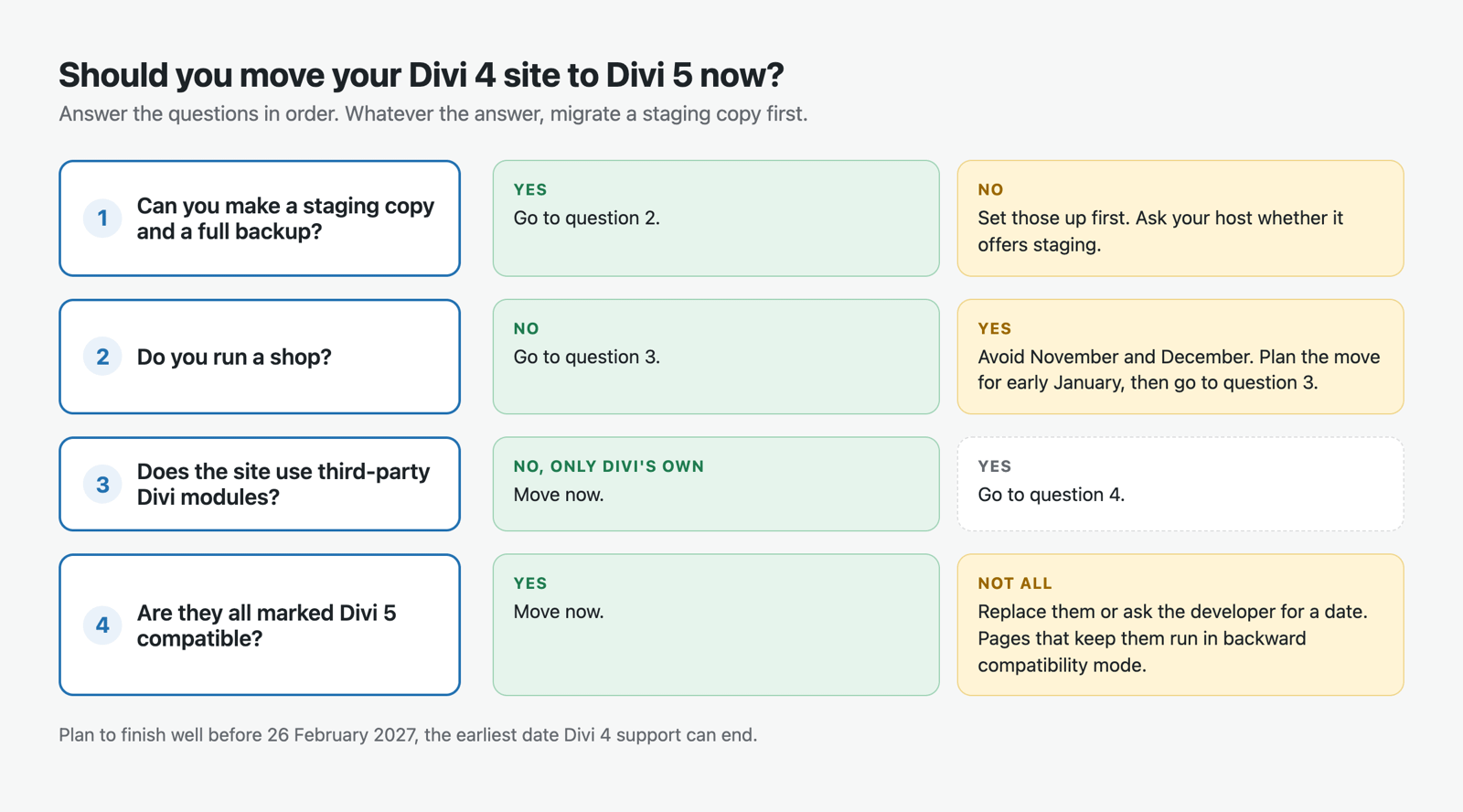
Move now if:
- your site is built with Divi’s own modules, or every extension you use is marked Divi 5 compatible
- you can set up a staging copy and test there first
- you want Design Variables or the Loop Builder for work you’re planning anyway
Wait a few weeks if:
- you depend on a third-party module that hasn’t been updated yet. Contact the developer and ask for a date, or look for a Divi 5 module that does the same job
- you have a lot of custom CSS or a child theme, and no time to check it this month
Wait until January if you run a shop. Black Friday is 27 November this year. Changing the framework under a WooCommerce store in the busiest weeks of the year is a risk with no upside. Move in early January, test the product, basket and checkout pages carefully, and you’ll still have about seven weeks before the support floor.
If you look after client sites, migrate your own site first. You’ll learn where the snags are on a site where a broken page costs you nothing but time.
🛠️ Moving safely: the short version
Elegant Themes’ official steps, condensed:
- Back up everything. Database, uploads, themes and plugins.
- Make a staging copy and do everything below there first.
- Update WordPress, Divi and every plugin to their latest versions.
- Check your extensions for Divi 5 compatibility.
- Enable Divi 5 updates in Divi → Dashboard, then update.
- Run the Migrator (Divi → Divi 5 Migrator) and review its compatibility scan before you confirm. Items with an orange warning icon will run in backward compatibility mode.
- Test. Front-end pages, the Visual Builder, menus, Theme Builder templates, forms, and WooCommerce if you have it.
- Only then repeat it on the live site.
One check people forget comes after go-live. Watch your analytics for a week. A page that suddenly loses visitors, or a jump in 404 errors, usually points to a template or link that didn’t survive. Any analytics tool will show you the traffic side. GreenOrb Statistics, the plugin I make, has a free Broken Pages report that lists each 404 address and how often it was hit.
👉 Not using Divi yet?
If you’re starting a new site, there’s no reason to begin on Divi 4. Divi 5 is what you get. At the time of writing, Divi costs $89 a year or $249 once for lifetime access, for unlimited websites, and every plan has a 30-day refund. The Pro plan adds Divi AI, Divi Cloud and team seats.
And if you’d rather someone else handled the move, I build and look after Divi sites for small businesses. Have a look at my web design service or get in touch.
❓ Frequently asked questions
Is Divi 5 free if I already have Divi?
Yes. Elegant Themes says the upgrade is free for everyone with a Divi membership, yearly or lifetime.
When does Divi 4 support end?
No end date has been set. Elegant Themes promises support for at least 12 months after Divi 5’s release on 26 February 2026, so until at least 26 February 2027, “and longer if practical”. Support covers security and WordPress compatibility fixes, not new features.
Do I have to move to Divi 5?
Not yet. Your Divi 4 site keeps working and keeps getting security fixes during the support window. Eventually Divi 4 will reach end-of-life, so plan the move rather than waiting for a deadline.
Can I go back to Divi 4 after migrating?
Yes, with care. The Migrator saves your Divi 4 content and has a “Restore Divi 4 Content” button, after which you reinstall Divi 4. It’s cleanest straight after migrating. Always take a full backup first as well.
Will my third-party Divi modules still work?
Usually, yes. Modules not yet updated for Divi 5 run in backward compatibility mode. They work, but any page using one loads the old Divi 4 framework and misses Divi 5’s speed improvements.
Will Divi 5 make my site faster?
It should help. Divi 5 loads only the code each page needs and builds critical CSS automatically. How much faster depends on your hosting, images and other plugins, and on whether any pages still run legacy modules.
Sources
Checked on 9 October 2026.
- Elegant Themes: Divi 5 Official Release Date (14 January 2026)
- Elegant Themes: Divi 5 Official (Beta Ends Today) (26 February 2026)
- Elegant Themes Help Center: How to Safely Migrate from Divi 4 to Divi 5
- Elegant Themes: Divi 5.14 Release Notes (30 September 2026)
- Elegant Themes: Introducing the Divi AI Agent
- Elegant Themes: Divi 5 features and pricing
This post contains affiliate links to Elegant Themes. If you buy through them I may earn a commission, at no extra cost to you.


0 Comments