
Rank Math on Divi 5 does its job. Your page titles, meta descriptions, schema and sitemap all reach Google as they should. One thing has changed since Divi 4, though: Rank Math no longer appears inside the Divi Visual Builder, so you set everything up from the WordPress editor instead.
I tested every step on a Divi 5 site on 12 October 2026, with Rank Math 1.0.280, first on Divi 5.11.1 and then on Divi 5.15.1. The two versions gave different results, and that difference is in step 5.
⚡ Rank Math on Divi 5: the short answer
- What works: SEO titles, meta descriptions, social sharing tags, schema, canonical links and the XML sitemap. I checked each one in the live page’s code.
- What doesn’t: the Rank Math panel inside the Divi 5 builder. Rank Math’s support team has said they’re working on it with Elegant Themes, with no date given.
- Update Divi first. On Divi 5.11.1, Rank Math couldn’t read the text on Divi 5 pages, so its score was wrong. On Divi 5.15.1 it reads them properly.
- Where to work: set titles and descriptions in the Rank Math box in the WordPress editor, or in bulk from the Pages list.
1. Install Rank Math and run the setup wizard
Install the free Rank Math SEO plugin from Plugins → Add New and activate it. The setup wizard opens straight away.
Rank Math suggests choosing Advanced mode rather than Easy. It shows a few more settings, and you can switch later. Then work through the screens:
- Import: if you’re moving from another SEO plugin, bring its settings and page data across here.
- Your Site: choose whether the site is for a business or a person, pick the business type, and add your business name and logo. The logo needs to be at least 112 × 112 pixels, and Rank Math recommends a 1200 × 630 default image for social sharing.
- Analytics: connect your Google account to link Search Console. This is optional but useful, because Rank Math then shows your search clicks inside WordPress. It also adds a stats bar to the top of your pages, which I explain under “Things to know”.
- Sitemap: leave it switched on. Google uses it to find your pages.
- Schema: leave the defaults. You can change individual pages later.
2. Set your site-wide defaults
Go to Rank Math SEO → Titles & Meta. These settings fill in titles and descriptions for any page you don’t set by hand.
The two worth checking first:
- Global Meta → Separator Character, the symbol between the page name and your site name, as in “Hot Tubs | Example Showroom”.
- Homepage. If your Divi site uses a static page as its homepage, as most do, you set its title and description on that page itself, in step 3.
3. Write each page’s title and description
This is the part that matters most for Google, and on Divi 5 you do it outside the builder.
Open the page in the WordPress editor, not the Divi builder. From the Pages list, click the page’s title rather than “Edit With Divi”. Scroll down to the Rank Math SEO box and click Edit Snippet. Write a title of up to about 60 characters and a description of up to about 160, and the preview shows how they’ll look in Google.
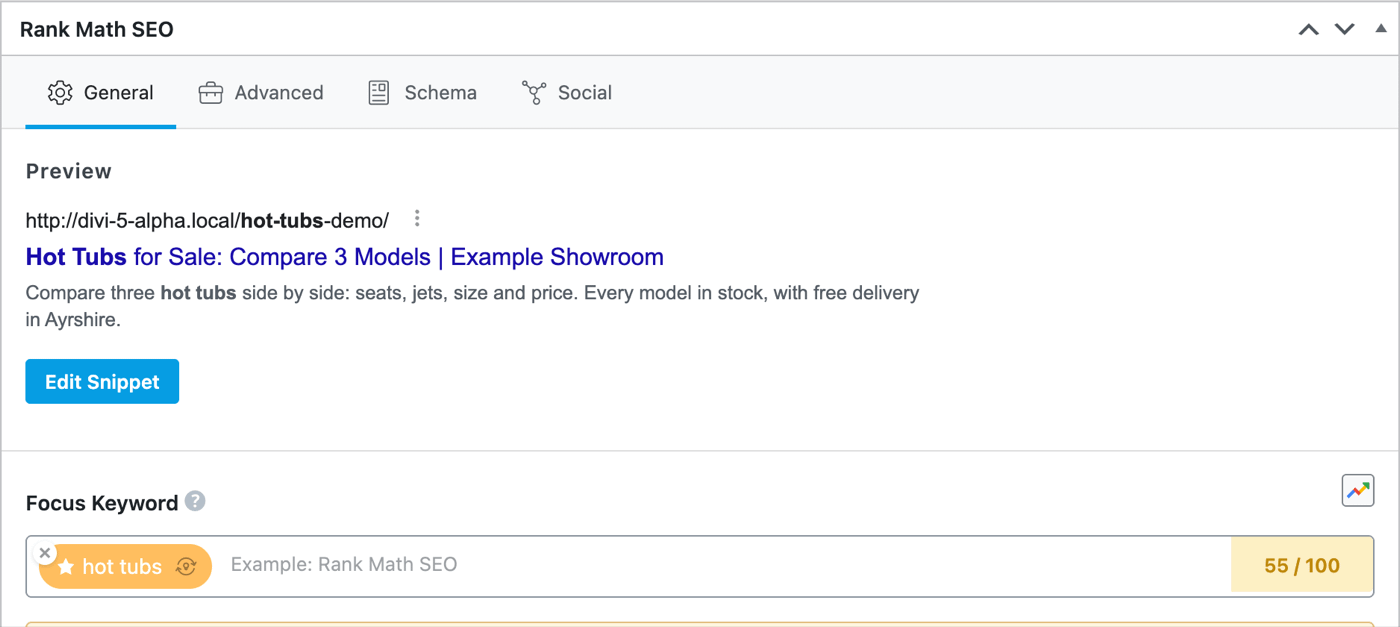
Click Update. The title and description go live straight away, even though you never opened Divi.
4. Or do many pages at once from the Pages list
If you have a lot of pages, there’s a quicker way. Go to Pages → All Pages. Rank Math adds SEO Details and SEO Title columns, and you can switch on SEO Desc under Screen Options at the top of the screen.
Click the pencil icon beside a column heading to edit that column for every page on screen, then click Save All Edits.

The score in this list only appears once the page has been saved in the WordPress editor. Until then it shows N/A. My test page showed N/A until I opened it and clicked Update.
5. Update Divi before you trust the score
Rank Math’s score comes from checks such as “Focus Keyword found in the content” and “Content should be 600-2500 words long”. To run them it has to read the page’s text, and Divi 5 stores that text inside the page’s block data rather than as normal text.
On Divi 5.11.1, Rank Math couldn’t read it. An article of over 700 words about Scaler 2, using “Scaler 2” 23 times, was marked as missing the keyword and too short.
On Divi 5.15.1, the same article scored 84 out of 100. Rank Math found the keyword, found it in the first 10% of the text and counted 768 words.

Newer versions of Divi send the finished page to Rank Math when you open it in the WordPress editor. Divi’s changelog doesn’t mention this, so I can’t tell you which version between 5.11.1 and 5.15.1 added it. If Rank Math tells you a long Divi 5 page is too short, update Divi and check again.
Two things haven’t changed:
- The score is only worked out in the WordPress editor. Open the page there to see it, and click Update to store it in the Pages list.
- Blog posts you write in the WordPress editor were never affected. Rank Math has always read those normally.
6. Check what Google will see
Once a page is published, confirm the title and description really are there. Open the live page, right-click and choose View Page Source, then search for <title>. Your SEO title should be inside it, and the description a few lines below, after name="description".
To check the schema, paste the page’s address into Google’s Rich Results Test. On my test page, the page source already contained the Article schema Rank Math adds by default.
🔁 What about Divi 4 sites?
On Divi 4, Rank Math’s panel works inside the Divi builder. If you’re staying on Divi 4 for now, nothing here changes for you until you move. When you do, my guide to moving to Divi 5 covers when and how.
⚠️ Things to know
The missing builder panel isn’t a fault on your site. I looked at the code of both plugins. Rank Math’s Divi integration was written for the Divi 4 builder. It waits for a “ready” signal that the Divi 4 builder sends, then adds its SEO button to Divi 4’s settings bar. The Divi 5 builder was rebuilt from scratch and has neither, so Rank Math loads but has nowhere to appear. Divi 5’s own Rank Math code doesn’t add a panel either. It handles sitemap images and the score in the WordPress editor.
The builder panel may come back. Rank Math’s support team has said they’re working with Elegant Themes on Divi 5 support. I’ll update this post when the panel returns. Until then, check Rank Math’s changelog before assuming it has.
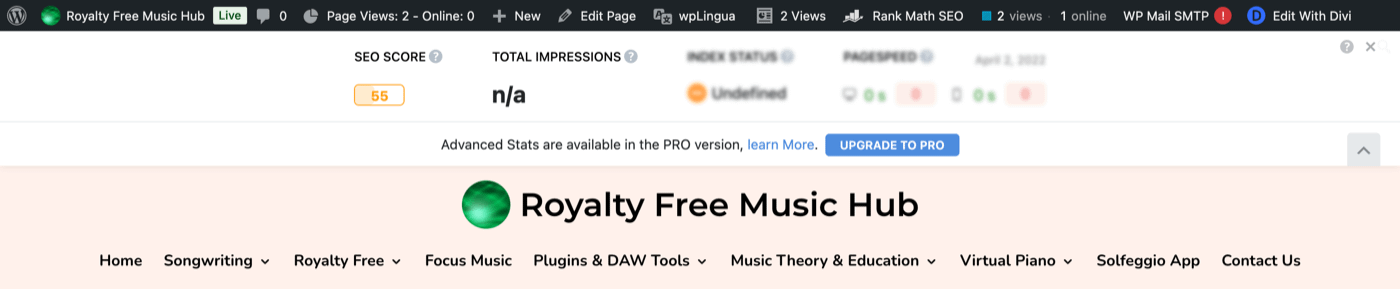
The stats bar across the top of your pages. Once Rank Math is connected to Search Console, it shows a bar under the admin bar on every page and post, with the SEO score, search impressions and index status. Only logged-in users with access to Rank Math’s Analytics see it, which by default means admins. Visitors never see it. It’s a Rank Math feature, so it appears with any theme, not just Divi. The arrow on the right folds it away for you only. The × switches it off for the whole site, and so does Rank Math SEO → General Settings → Analytics → Frontend Stats Bar.
Other SEO plugins. Divi 5.15.1 also includes the same content fix for Yoast SEO. I haven’t tested Yoast, so check its score on a Divi 5 page before relying on it.
The score was never the goal. A green 90 doesn’t rank a page and an orange 50 doesn’t stop one. What Google sees is the title, the description, the content on the live page and how useful it is.
👉 Need a hand?
If you’d rather have your Divi site’s SEO set up for you, it’s part of what I do for small businesses. Have a look at my web design service or get in touch.
❓ Frequently asked questions
Does Rank Math work with Divi 5?
Yes. Titles, descriptions, schema and sitemaps all work, and on Divi 5.15.1 its score reads Divi 5 pages correctly. What’s missing is the panel inside the Divi 5 builder. I tested this with Rank Math 1.0.280 in October 2026.
Where do I set the SEO title on a Divi 5 page?
Open the page in the WordPress editor rather than the Divi builder, scroll to the Rank Math SEO box and click Edit Snippet. Or use the SEO Title column in the Pages list.
Why does Rank Math say my Divi 5 page has no content?
Older versions of Divi 5 stored page text where Rank Math’s checks couldn’t read it. Update Divi to the latest version and open the page in the WordPress editor again. On Divi 5.15.1 the problem had gone.
Should I switch to a different SEO plugin?
Not because of this. The parts that affect Google work, and the score works on an up-to-date Divi.
Will Rank Math’s builder panel come back?
Rank Math’s support team has said they’re working on Divi 5 compatibility with Elegant Themes, without giving a date.
Sources
Checked on 12 October 2026.
- WordPress.org support forum: Rank Math SEO Integration for Divi 5
- Elegant Themes on GitHub: Rankmath SEO Plugin Integration Not working, issue #315
- Rank Math: How to set up Rank Math and the changelog
- Google: Rich Results Test
Screenshots are from a demonstration site running Divi 5.15.1 and Rank Math 1.0.280, with example content.



0 Comments