
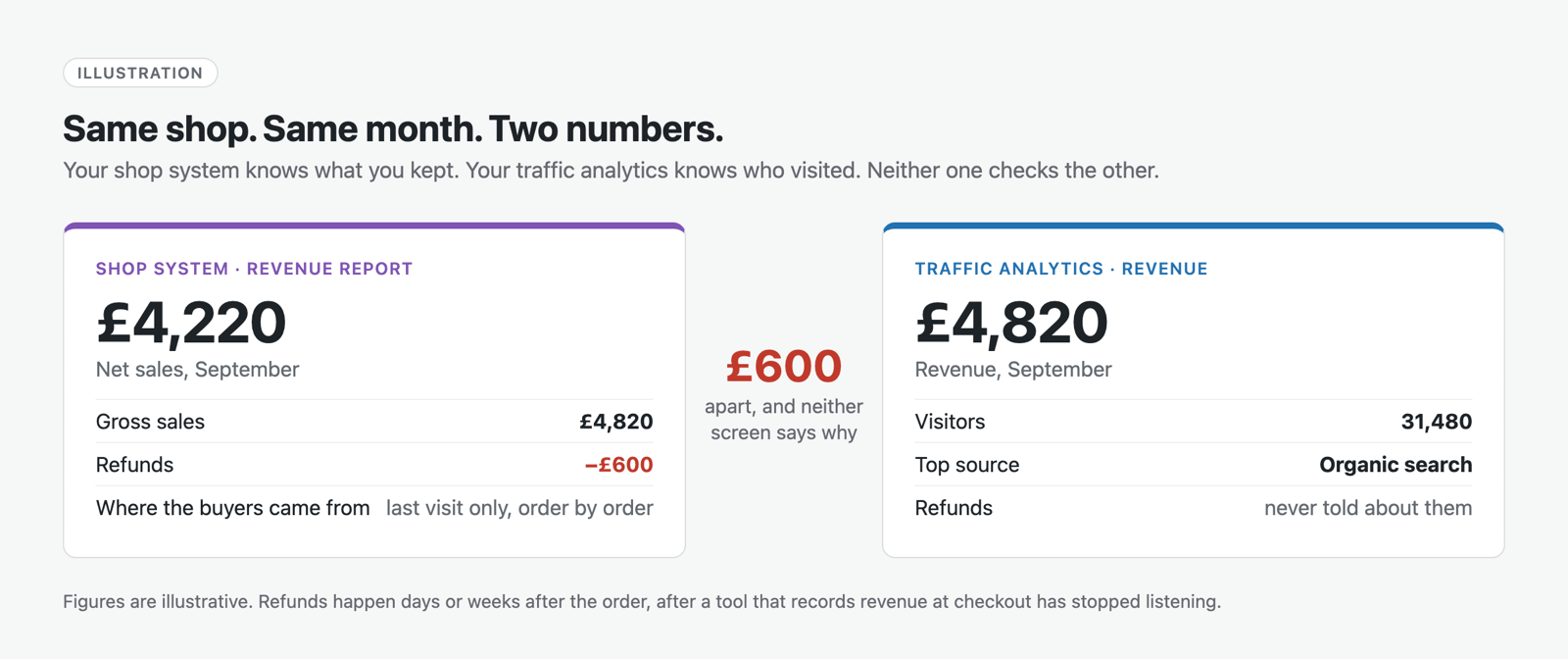
You open WooCommerce Analytics on a Monday morning. Net sales, £4,220. The refunds are already taken off. Good month.
Then you open your traffic analytics to see where that month came from. It says £4,820.
Same shop. Same month. Two numbers, £600 apart, and neither screen mentions the other. One knows what you kept. The other knows who visited. Nothing puts the two together.
WooCommerce is not doing a poor job. It was built to run a shop, analytics tools were built to count visitors, and the most useful questions sit in the gap between them.
What WooCommerce Already Tells You
You should not pay anyone for something you already have.
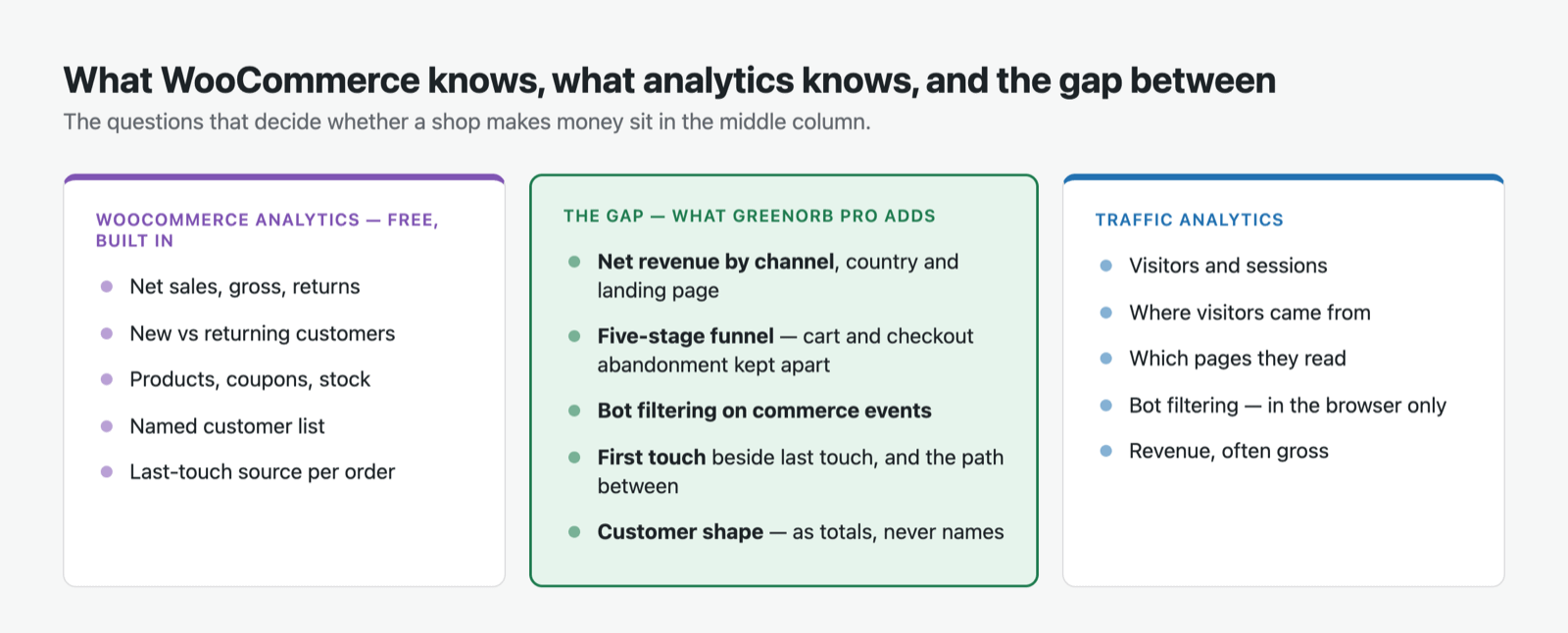
WooCommerce’s own Analytics screens are good. Out of the box, for free, you get:
- Net sales, with gross and returns alongside, and refunds recorded as they happen.
- New vs returning customers, recognised by account or billing email, guests included.
- Coupons, products, categories, variations and stock, each with their own report.
- A customer list showing every buyer’s order count, total spend and average order value.
- Order attribution on every order: the source, campaign, device, and how many pages the buyer viewed on the visit that converted.
If that covers everything you need, you are in good shape, and plenty of shops run happily on it for years.
What it doesn’t do is connect any of it to the journey. Where the shoppers came from before that final visit. Where the ones who didn’t buy gave up. Whether the ones who nearly bought were people at all. Those are the four things below.
1. Net Sales, Put Against the Traffic
Back to the Monday morning, and the £600.
Refunds are an accounting event, not a tracking event. They happen days or weeks after the order, long after a visitor-tracking tool stopped paying attention. If an analytics tool builds its revenue figure from the moment an order is placed, it never hears about the refund. So WooCommerce knows your net figure but not where the visitors came from, and the analytics tool knows where the visitors came from but quotes you the gross.
GreenOrb Statistics leads with Net Sales, with gross and refunds directly beneath it, and the daily revenue chart is net as well. That part only catches up with what WooCommerce already knows.
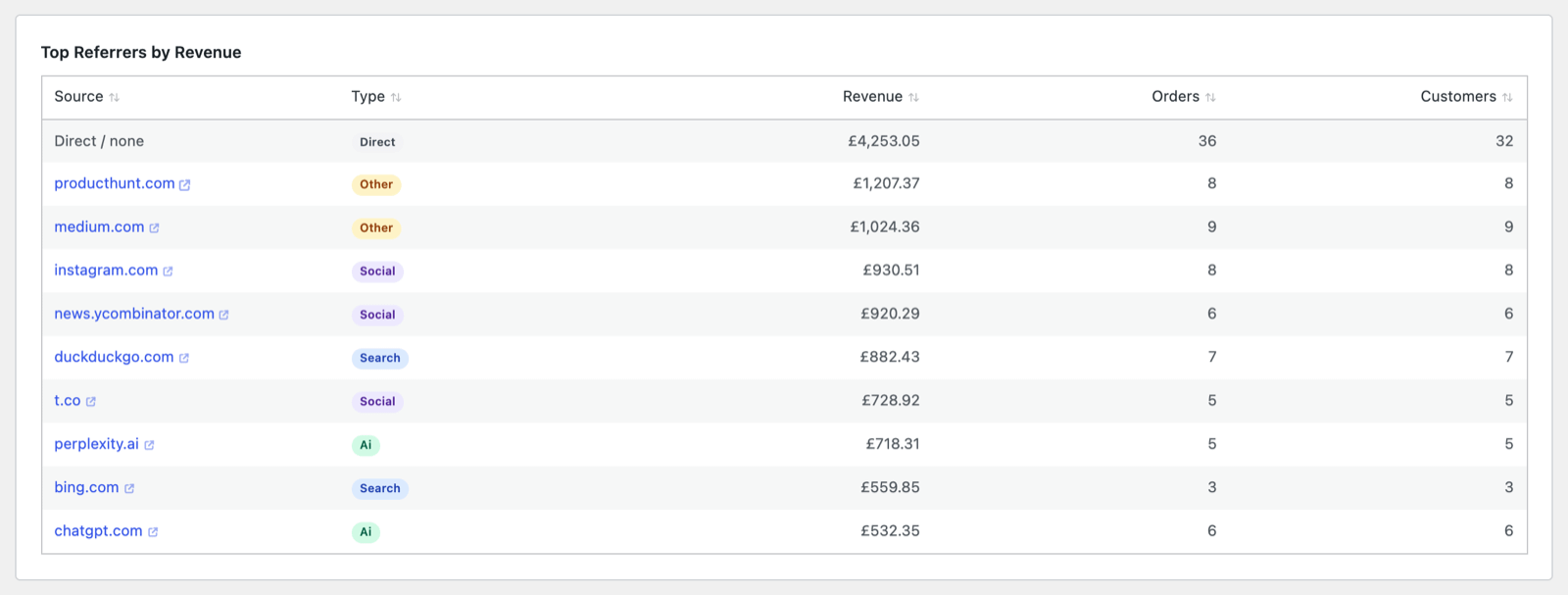
The useful part is what happens next. Because the refund-aware figure sits in the same place as the traffic data, you get net revenue by referrer, country, campaign and landing page, and earnings per visitor for the period. A channel that sends plenty of orders and most of the returns stops looking like your best channel. Historical orders are backfilled, so it’s right from the day you install rather than the day you noticed.

2. “Abandonment” Is Two Completely Different Problems
WooCommerce records the orders you got. It has nothing to say about the ones you didn’t.
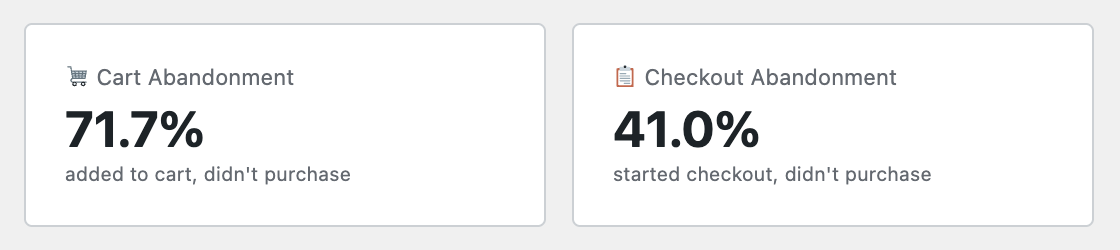
And the ones you didn’t get did not all fail the same way. A shopper who fills a basket and drifts off has a pricing, shipping or persuasion problem. A shopper who reaches your checkout, types in their address, hits pay and doesn’t complete has a checkout problem. Different cause. Different fix. One of them is money sitting in plain sight.
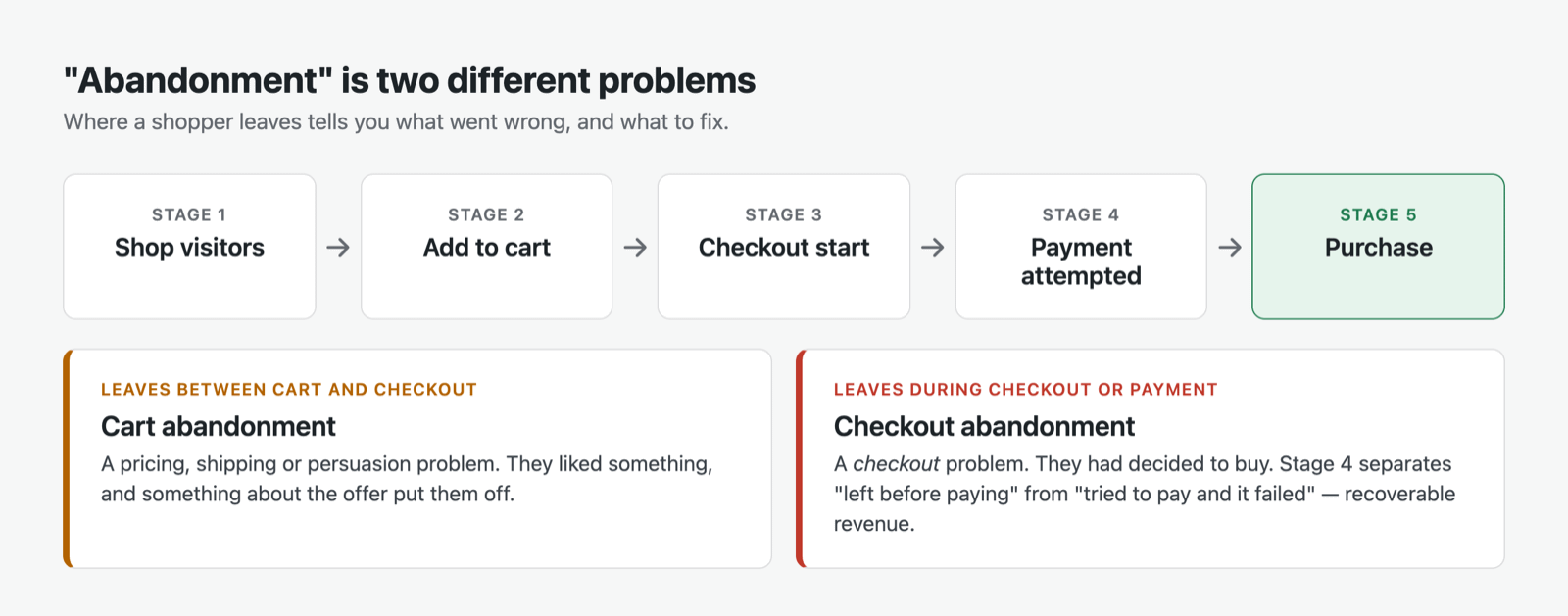
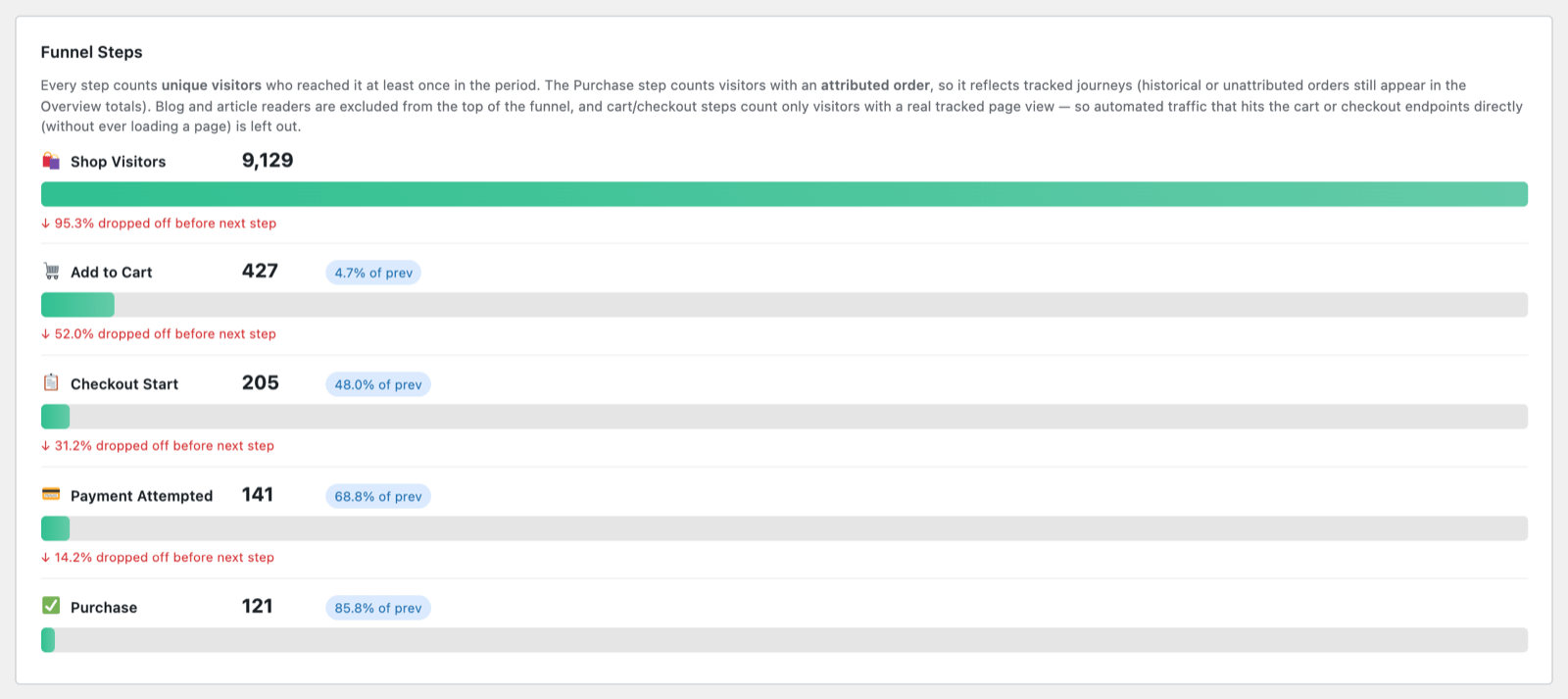
GreenOrb’s funnel runs five stages: Shop Visitors → Add to Cart → Checkout Start → Payment Attempted → Purchase. That gives you cart abandonment and checkout abandonment as separate rates, with separate tables listing the sessions behind each. Click the visitor chip on any row and the whole story opens up: what they read beforehand, whether they came back later, whether a later session converted.
Two details make those numbers worth trusting.
Checkout Start is measured on the checkout page loading. A lot of reporting hangs this on classic checkout-form hooks, which a block-based checkout never fires. Stores on modern checkouts can therefore under-count abandonment badly and never be told. GreenOrb watches for the checkout page itself, which happens however your checkout is built.
When a step can’t be measured, it is removed rather than faked. Payment Attempted relies on your checkout firing a standard order-processed hook, and some block-based and off-site redirect checkouts don’t. When GreenOrb can see that the step isn’t being captured, it hides it and says so on screen, rather than showing you a dramatic drop-off that is really a blind spot. Every other stage carries on unaffected.
And because a funnel that inverts is an embarrassment nobody needs, the top of this one is a true superset: everyone who viewed a shop or product page, added to basket, started checkout or ordered. You will never see more add-to-baskets than shop visitors. Blog readers are kept out of the top entirely, so your conversion rate isn’t dragged down by people who came to read an article. Where a step really does exceed the one above it (a “buy now” flow that skips the basket, say), you get the real figure with a ⚠ marker rather than a tidied-up lie.
3. The Bots in Your Commerce Data
This is the one I would most want a shop owner to read.
Analytics plugins filter bots in the browser, using JavaScript. WooCommerce events (added to basket, checkout started, order placed) happen on the server. The tracking script never sees them. Which means the bot filtering you think is protecting your numbers has no jurisdiction over your commerce data at all. WooCommerce itself doesn’t try; it records what it is sent.
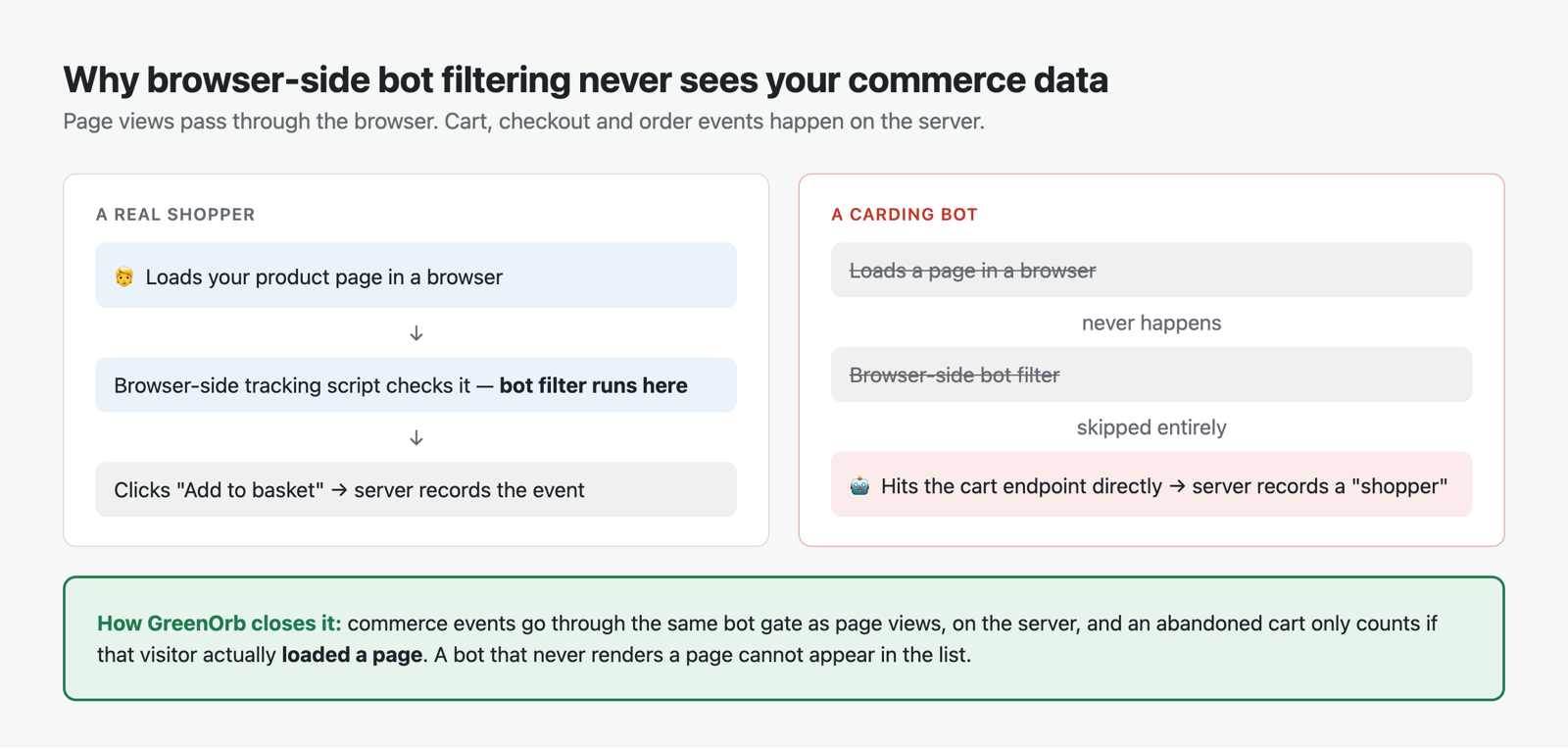
I didn’t add bot filtering to the commerce side because it was on a roadmap. I added it because of an abandoned-cart table that filled up with hundreds of shoppers who had nearly bought something. A carding attack. Software hammering the cart endpoint directly, never loading a single page, generating a queue of near-customers that looked, on screen, like the best week the shop had ever had.
GreenOrb Statistics closes that from two directions. Commerce events run through the same bot gate as page views, so automation is refused at the point of recording. And the abandoned-cart tables require the visitor to have actually loaded a page. Software hitting endpoints directly with no page render cannot appear, whatever it claims to be in its headers. Because abandonment is worked out on demand rather than stored, that second rule cleaned out the existing table the moment it shipped.
If your abandoned-cart list has ever looked suspiciously busy next to your actual sales, this is very likely why.
4. What GreenOrb Does Not Do
Five things to weigh before you buy.
It is WooCommerce only. No Easy Digital Downloads, no SureCart, no membership platforms. If your shop isn’t Woo, this module has nothing for you at all.
Long sales cycles won’t fully stitch for every visitor. Conversion paths thread visits together on a pseudonymous browser signature over a 30-day lookback. For a visitor who accepted cookies that signature holds for around a year. For one who didn’t, it is bounded to the calendar month, so a 60-day consideration period won’t join up for them. The interface says so where it matters.
Guest checkout is weaker early in the funnel. A guest’s email isn’t known when they add to basket, so their early-funnel events fall back to the browser signature rather than the stable customer identity. Once they order, they’re recognised properly.
A fully refunded order doesn’t appear in the Refunds figure. It is excluded from gross and net alike, because it nets to zero, so both of those stay correct. But WooCommerce’s own Returns figure does include it, so the two won’t match exactly.
There are no saved reports or segments yet. Some tools give that away free. We don’t have it.
None of that is going to change this month. You should know it before you spend anything.
5. Who Buys?
WooCommerce already tells you who your customers are. By name. That is exactly what a shop system should do. You need it to post the parcels.
A statistics screen is a different job. It is where you go to understand the shape of your business: repeat custom, basket size, how long people take to come back. None of that needs a name, and a screen that shows you names is one more place your customers’ details are sitting.
So the Insights screen answers the shape questions, and only those:
- New vs Returning customers, each with their own order count, revenue and average order value.
- Basket size bands, from single-item to multi-item, with each band’s share.
- Customer lifetime value: average lifetime value, orders per customer, repeat rate, and the average number of days between orders.
- Payments and checkout: orders and revenue by payment method, shipping collected by method.
- Coupons: which codes get used, how often, and what you gave away.



Every one of those is an aggregate. A count of customers, never a list of them.
Behind the count, a customer is identified the way WooCommerce identifies them, by their account or by billing email for a guest, but only ever as a one-way scrambled code. GreenOrb never stores the email itself. So a buyer who orders on their phone in March and their laptop in June is still one returning customer, and nobody reading the report can work out who they are.
One other detail. Some payment gateways bury customer emails and card fragments inside the payment method title, such as “PayPal (payer@…)”, “Visa ending in 4242”. Leave that alone and your tidy aggregate breakdown quietly becomes a customer list by accident, one row per human being. GreenOrb scrubs those labels. One row per payment method. Nothing personal leaking into a report that was never meant to hold it.

6. Attribution: Both Ends, and the Middle
WooCommerce already records attribution on every order: the source of the visit that converted. That’s last touch, and it’s a useful start.
GreenOrb Statistics adds the rest.
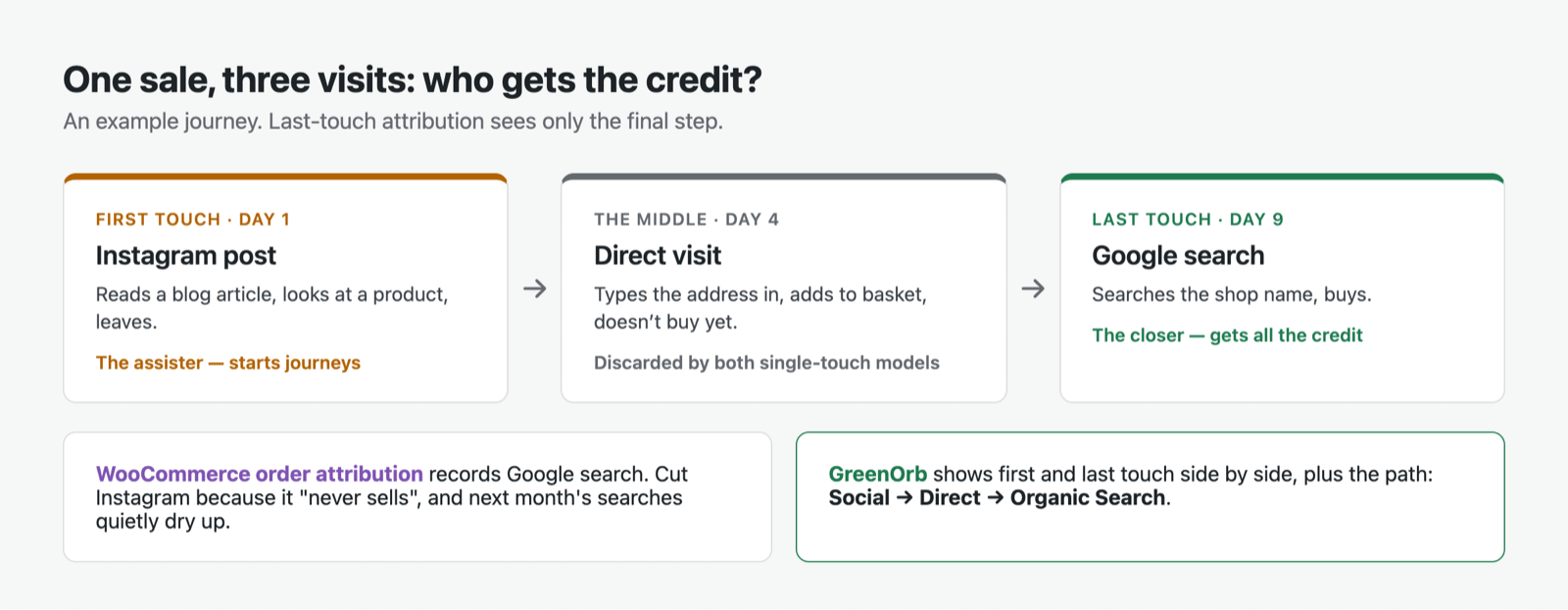
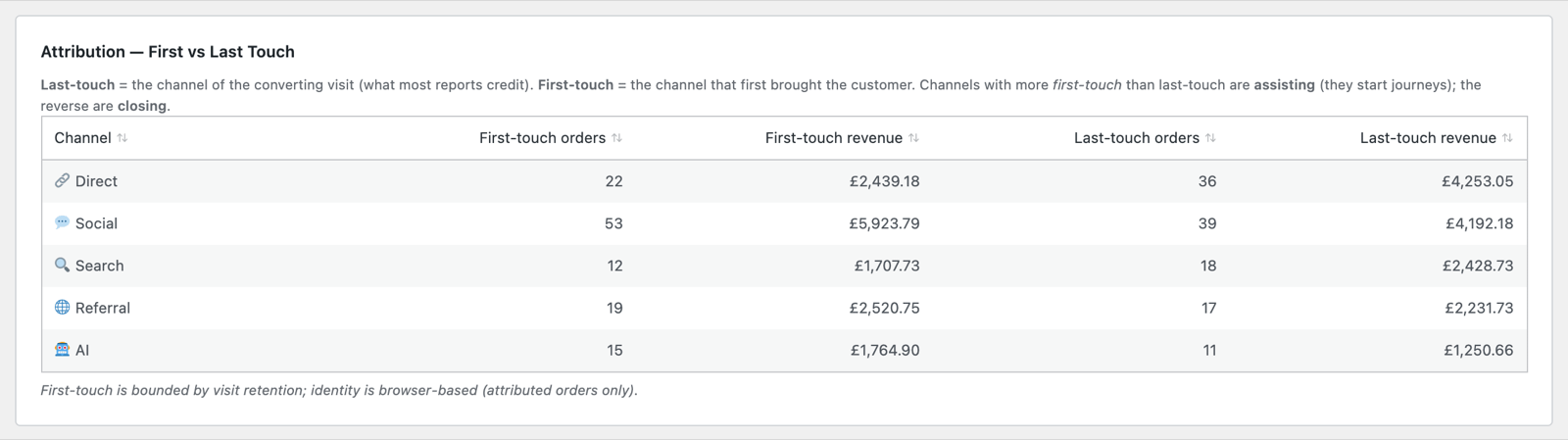
First vs Last Touch, side by side. Last touch credits the channel of the converting visit. First touch credits the channel that first brought the customer. Shown together they tell you something neither can alone: a channel with more first-touch than last-touch orders is an assister: it starts journeys that others finish. The reverse is a closer. Search usually closes. Social and referral usually assist. Judge an assister by last touch alone and you will cut the very thing that was feeding your best channel.
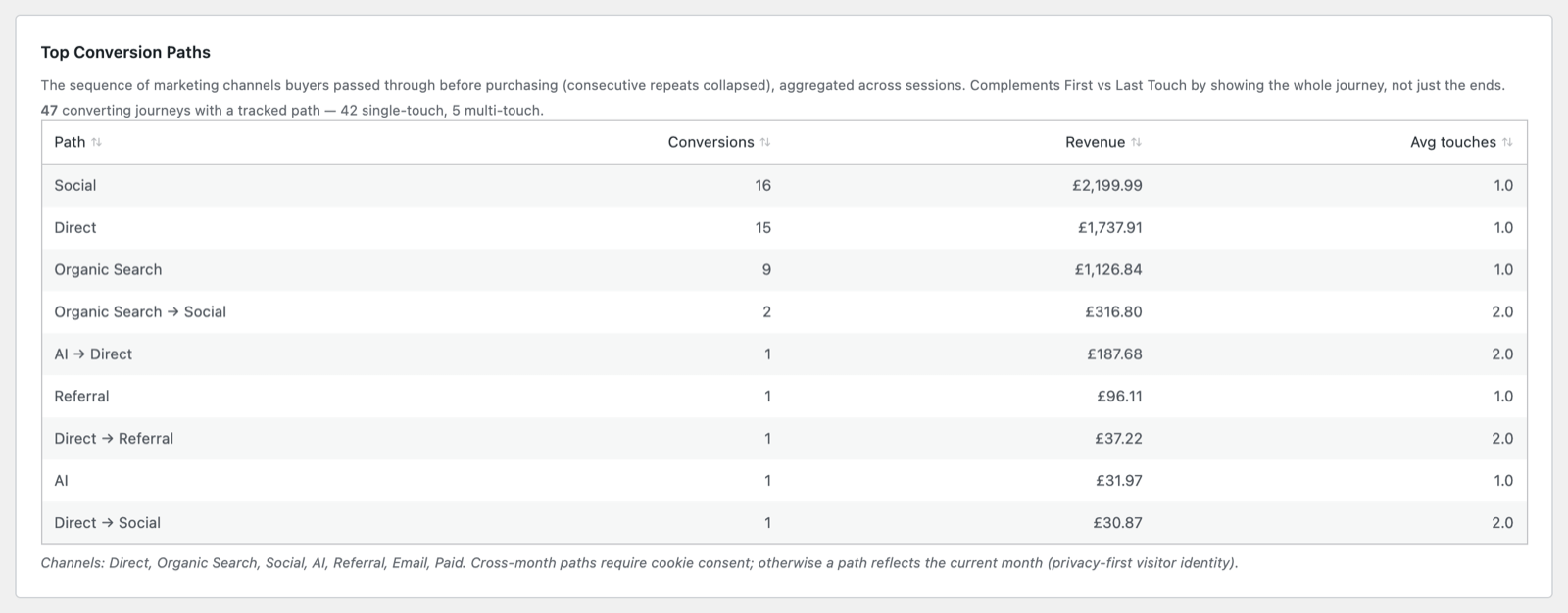
Top Conversion Paths shows the actual sequence a buyer moved through, such as Social → AI or Direct → Organic Search, with conversions, revenue and average touches. That’s the middle of the journey. Both single-touch models throw it away.
Landing Pages by Revenue and Time to Purchase finish the page off: which entry pages earn, and how long buyers take to make their minds up.
7. Why It’s in the Entry Tier
A word on price, because it is part of the comparison.
Where store analytics exists elsewhere in this market, it tends to sit near the top of the ladder, in the tier above the one a small shop would otherwise buy. GreenOrb Statistics includes the whole WooCommerce module in Pro at $49 for a single site. Not an add-on. Not a tier upgrade. Not five separate extensions that each do one of the things above.
A shop turning over a few thousand a month is exactly the shop that most needs to know which channels earn net of returns, where its checkout is leaking, and whether its abandoned baskets are real people. Pricing that out of reach of the shops that need it most has never made any sense to me.
8. Beyond the Sale
WooCommerce tells you what you sold and what you kept.
GreenOrb Statistics Pro covers the journey around it: which channels earn once the returns come back, where the shoppers who didn’t buy gave up, whether they were people at all, and what happened between the first visit and the last.
A shop that only looks at the sale will cheerfully spend more on a channel that is sending bots to a checkout that has been quietly failing on mobile since March.
Every number in these reports can be opened up, traced to its definition, and checked.
Screenshots show GreenOrb Statistics Pro as of version 1.0.5, on a demonstration store with test data. Every figure in them was calculated by the plugin; none has been edited.
Frequently Asked Questions
Doesn’t WooCommerce Analytics already do this?
Some of it, and it does it well: net sales, new vs returning customers, coupons, products and last-touch attribution are all built in. What it doesn’t have is a funnel, cart and checkout abandonment, bot filtering on commerce events, first-touch attribution or conversion paths, or any link between revenue and your traffic and content. GreenOrb is built to sit alongside it, not replace it.
Do my own test orders show up in the figures?
No. Orders placed while you’re logged in as an administrator or shop manager are excluded by default, so your manual and test orders don’t skew anything. To test the tracking properly, order while logged out or in a private window, or switch admin-order tracking on in Settings if you actually want those counted.
Why is my conversion rate higher in GreenOrb than I expected?
Because the top of the funnel counts shop engagement, not all traffic. Someone who read a blog post and left isn’t counted as a failed shopper. If your site is part content and part shop, a conversion rate calculated against total visitors will always look worse than one calculated against people who actually looked at the shop.
Why doesn’t GreenOrb’s Refunds figure match WooCommerce’s Returns?
Because a fully refunded order is excluded from GreenOrb’s gross and net, since it nets to zero. That keeps both of those accurate, but means its value doesn’t appear in the Refunds total. WooCommerce counts it under Returns. Partial refunds on valid orders are captured in full by both.
Can I see which individual customer bought what?
Not in GreenOrb, and that’s deliberate. WooCommerce’s own Customers report already does that job. Every figure in GreenOrb’s store reports is an aggregate. Customers are counted by a one-way scrambled code of their account or email, never the email itself, and gateway labels containing emails or card fragments are scrubbed before they reach a report.
Why does the Payment Attempted step sometimes disappear?
That stage relies on your checkout firing a standard WooCommerce order-processed hook, and some block-based or off-site redirect checkouts don’t fire it. Rather than show you a dramatic drop-off that’s really a measurement gap, GreenOrb detects that the step isn’t being captured, hides it, and tells you on screen. Every other stage of the funnel carries on as normal.
Want the full technical detail? See WooCommerce for every screen and figure, Goals & Conversions for how a conversion path is built, and Understanding your metrics for the identity model behind customer counts.



0 Comments