
Referrers & traffic sources
Documentation
The Referrers screen shows where your visitors come from — search engines,
social platforms, AI assistants, and other sites linking to you. Open it from
Audience → Referrers.
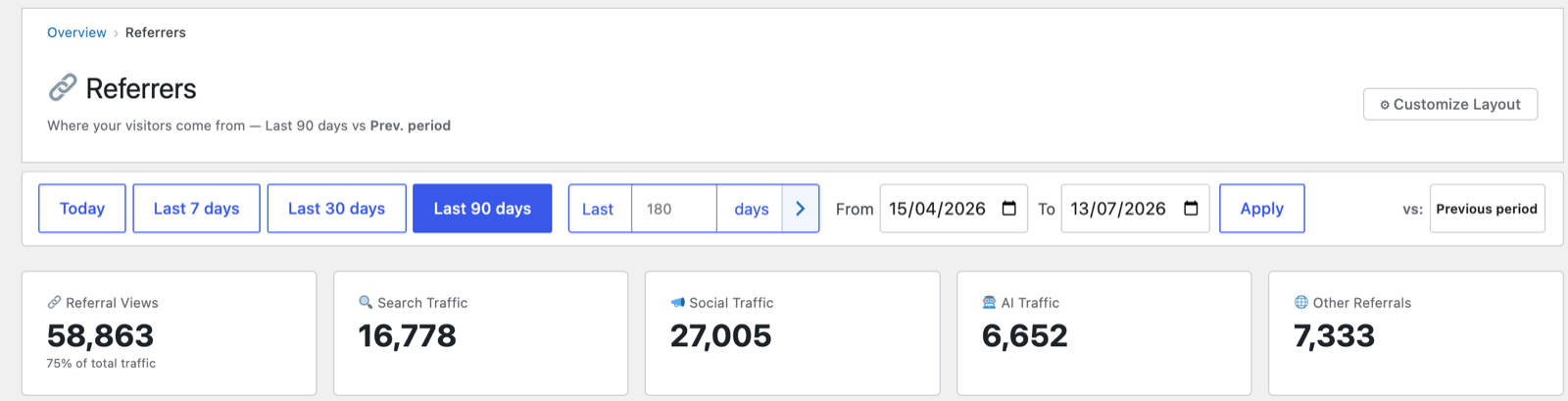
Headline cards
- Referral Views — total views that came from another site (with their share
of all traffic). - Search Traffic — from search engines.
- Social Traffic — from social platforms.
- 🤖 AI Traffic — from AI assistants and chatbots (ChatGPT, Perplexity, Gemini,
Copilot, etc.). As AI search grows, this is an increasingly important channel
most analytics tools don't separate out. - Other Referrals — everything else.
Channel Mix
A single proportional bar showing how your referral traffic splits across
Search · Social · AI · Other, with exact view counts and percentages — a quick
read on which channel is carrying your traffic.
Channel breakdown tables
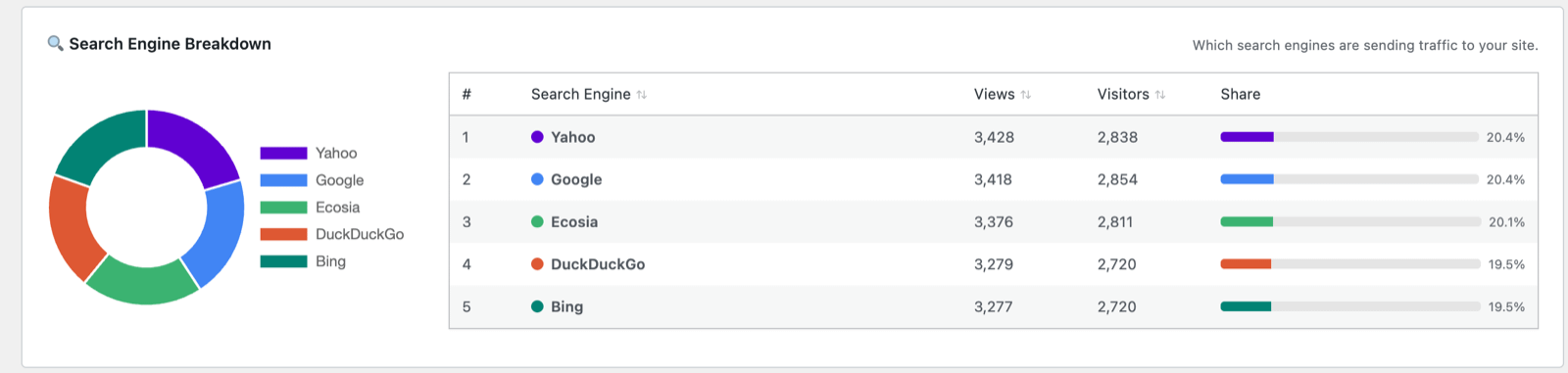
Below the mix, sortable tables drill into each channel:
- Search Engine Breakdown — a donut chart plus a table of which engines send
traffic (Google, Bing, DuckDuckGo, Ecosia, Yahoo…), with views, visitors and
share. - Social and AI breakdowns — the specific platforms/tools sending
visitors.
Top Referring Domains and Top Referring Pages
The last two tables on the page answer two different questions — and the second
one behaves in a way that surprises people, so it's worth understanding why.
Top Referring Domains
This lists the individual websites sending you traffic, one row per domain
(e.g. reddit.com, google.com, example-blog.com), with the channel type,
views and a share bar. View → opens the Visits log filtered to that referrer,
so you can see the individual hits it sent.
Clicking the domain name itself opens that site's home page in a new tab — not
the specific page that linked to you. A domain is all this table knows about, by
design: it deliberately rolls every link from a site up into one row so you can
see which sites matter without the noise of individual URLs.
Top Referring Pages
This table tries to show the exact external page that linked to you — for
example example-blog.com/best-royalty-free-music rather than just
example-blog.com. It is off by default and only appears once you enable it
under Settings → Privacy & Data → "Referrer page paths". Only the path is ever
stored — the query string is always stripped, so search terms, tokens and any
personal data in the link are never saved.
Why do many rows show only the domain (e.g. example-blog.com/) instead of a
real page? This is the part that looks like a bug but isn't. When someone clicks
a link to your site, their browser decides how much of the linking URL to pass
along, and modern browsers default to a privacy-protecting policy
(strict-origin-when-cross-origin). For clicks from another site that policy
sends only the origin — the domain — and strips the path. So for most external
links, the most the browser tells us is "they came from example-blog.com", which
we can only record as the site root (example-blog.com/).
You get a genuine deep page in this table only when the linking site has chosen a
more permissive referrer policy, or when the traffic comes from somewhere that
passes the full URL. That's why the report says it "fills in gradually" — real page
paths accumulate from the minority of sources that share them, while everything
else falls back to the domain. A few related cases:
- HTTPS → HTTP downgrades and many mobile apps send no referrer at all —
those visits show up as Direct, not in this table. - Search engines and most social platforms deliberately pass only their
domain (that's why a Google visit reads asgoogle.com/, never the search
results URL — which is also good for your privacy, since search queries stay out
of your database).
So the short version: Top Referring Domains is always complete;
Top Referring Pages is best-effort, and a domain-only row simply means the
browser didn't hand over the full path for that visit.
Tips
- The Domains table is the reliable one. Use Top Referring Domains to judge
which sites send you traffic; treat Top Referring Pages as a bonus that fills
in for the sources willing to share the full URL. - Clicking a name opens a page in a new tab, but mind which one: a domain row
(or a domain-only row in Top Referring Pages) opens the site's home page, not
the article that linked to you. Only rows that show a full path jump to the exact
page you were linked from. - Watch the AI Traffic trend over time — growth here signals your content is
being surfaced in AI answers. - A high Direct share (shown on Reports/Sessions) with low referral views can
mean strong brand recall, untagged campaigns, or simply the referrer stripping
described above — see Settings & Privacy and UTM campaign
tracking.
Next: Geography →