
Sessions
Documentation
A session is a single browsing visit. This screen lists every session
individually, so you can see exactly how people arrived, what they landed on, how
long they stayed, whether they engaged — and whether a person was even there.
Open it from Traffic → Sessions.
This is the screen where GreenOrb Statistics' accuracy shows most clearly, so it's
worth understanding what makes these numbers different before reading the table.
Why these numbers are more trustworthy
Most analytics tools judge a session with a single crude rule: one page view
equals a bounce. Time is then inferred from the gap between page loads, which
means the last page of every visit — and every single-page visit — scores zero
seconds.
For a content, media or music site, that's not a rounding error. It's a
systematic libel of your best visitors: the reader who lands on one article and
stays fifteen minutes is filed as a zero-second bounce, identical to a bot that
touched the page and vanished.
GreenOrb qualifies each session on three independent axes, and they compound.
1. "Engaged" means something real
A session counts as Engaged if any of these is true:
- the visitor viewed 2 or more different pages, or
- they spent meaningful engaged time on a page, or
- they scrolled well down a page and registered some real dwell time.
So a one-page visit where somebody genuinely read your article is correctly
counted as engagement, not written off. Two refinements keep it honest in the
other direction:
- Reloads don't count as pages. The "pages" test uses distinct pages, so
refreshing one page five times is still a bounce — the table marks these
"same page" so you can see why. - Scroll alone isn't enough. Short pages report 100% scroll the instant they
load, so the scroll test also requires real dwell time. An instant bounce on a
short page can't disguise itself as engagement.
2. The time behind it is real time
Engaged time is measured in the browser — visible time only, paused when the tab
is hidden, and gated on activity so a parked tab stops accruing about a minute
after the last interaction. Crucially, GreenOrb can measure the final page of a
visit, which gap-based tools structurally cannot.
The practical effect: your engaged-time figures are usually higher than other
tools report, and your bounce rate lower — not because GreenOrb flatters you, but
because it can see the engagement the others are blind to. See
Understanding your metrics.
3. You can see whether a person was there at all
Every session carries an input signal, shown beneath its Engaged/Bounce
badge:
| Chip | Meaning |
|---|---|
| 🖱️ Real input | A genuine mouse move, key press, scroll wheel or touch was recorded — a strong signal a person was present. |
| ▶️ Media played | No input device, but embedded media played. Often a real listener: a tap inside a YouTube or SoundCloud player is invisible to the page. |
| ⌨️ No input signal | Neither was seen — typical of automation. |
Reading it together with the engagement badge is where it earns its keep:
- Engaged + 🖱️ — a real, valuable visit.
- Bounce + ⌨️ — almost certainly automation.
- Engaged + ⌨️ — the interesting anomaly. Worth opening: long engaged time
with no human input at all is the signature of an automated browser holding a
page open.
No other axis can be faked into agreeing with the others, which is what makes
the combination trustworthy. For the full detection picture see
Bot detection explained.
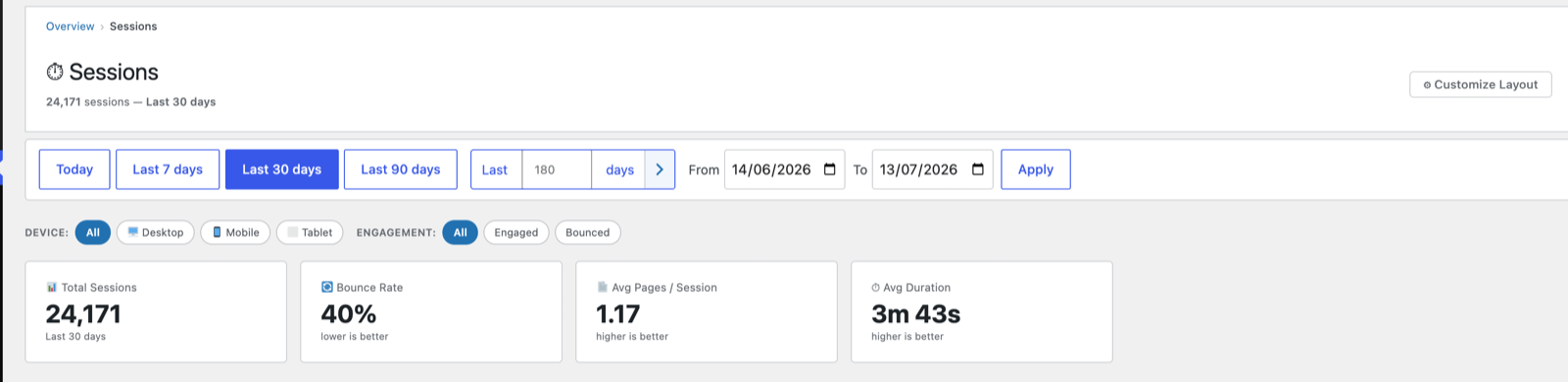
Headline cards
- Total Sessions in the range.
- Bounce Rate (lower is better).
- Avg Pages / Session (higher is better).
- Avg. time — average engaged time per session.
Filters
Two filter rows narrow the table:
- Device — All / Desktop / Mobile / Tablet.
- Engagement — All / Engaged / Bounced. This is the fastest way to
cut straight to the visits that mattered. "Engaged" here uses the full
three-part definition above, so it surfaces genuine single-page readers that a
simple pageview-count filter would hide from you.
The sessions table
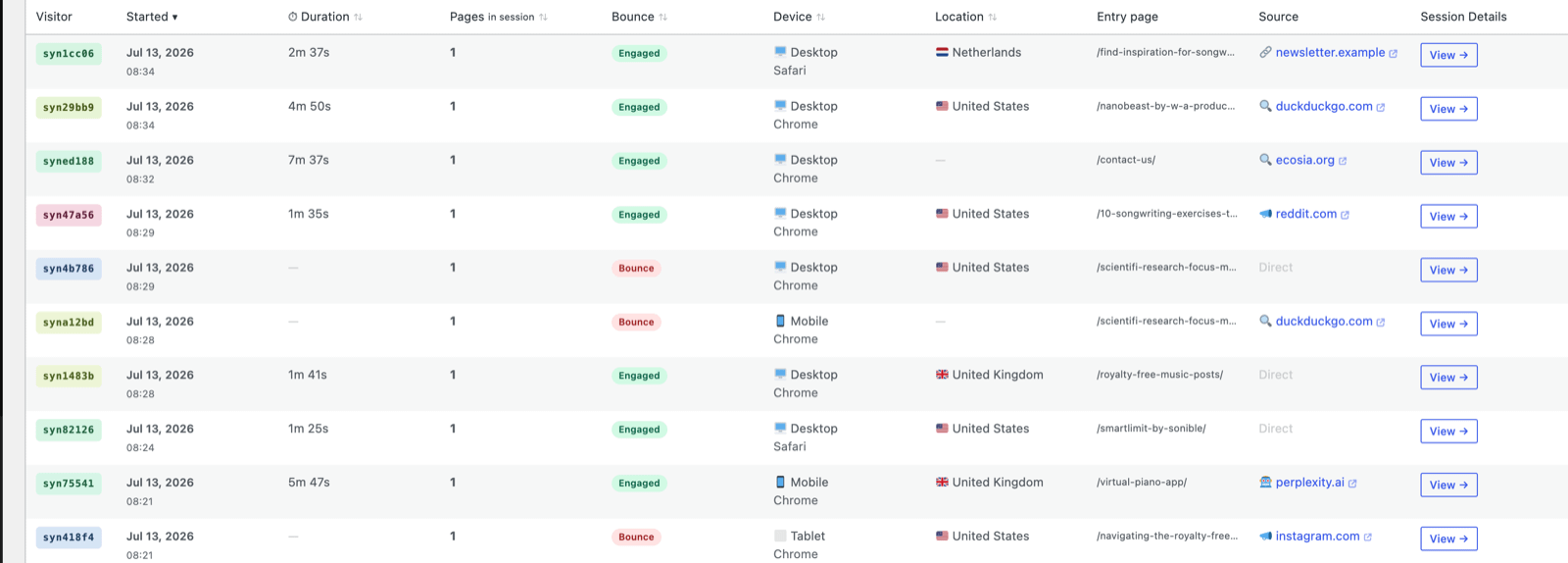
Each row is one visit:
| Column | Meaning |
|---|---|
| Visitor | The visitor's coloured ID chip — click it to open that visitor's full profile. |
| Started | Date and time the session began. |
| ⏱ Duration | Engaged time for the session. A — means no activity signal arrived at all: the visitor left before the first heartbeat, or it's automated traffic that never runs the tracker. |
| Pages in session | How many pages were viewed. |
| Bounce | An Engaged or Bounce badge, with the session's input signal chip beneath it. |
| Device | Device type + browser. |
| Location | Country. |
| Entry page | The first page of the visit (where they landed). |
| Source | Where they came from — search engine, referrer or Direct. |
| Session Details | View → opens the full session: the page-by-page path, timings and source. |
What the session timeline shows
View → opens the page-by-page path, and beside each page sit chips for what the visitor actually did there — not just that they were there:
- 👆 A tracked click. The chip carries the element’s label, and a count if they clicked the same thing more than once. Hover it for the full label and the link’s destination, where it had one.
- 🎵 Media played — an embedded video or audio player was started, with how far through they got.
- ⬇️ A file was downloaded.
- 🔗 An outbound link to another site, showing the destination host.
- 💰 An affiliate link was clicked.
- 📜 Scroll depth — how far down the page they actually got.
Repeated clicks on the same element group into a single chip with a count rather than repeating. Someone pressing the same button four times is one piece of meaning, not four, and the tracker ignores repeat clicks within a second, so each one that does count was deliberate.
The click chip is 👆 rather than the 🖱️ used for Real input above. On visitor detail the two appear on the same screen, and one icon meaning both “a mouse was used” and “this element was clicked” would be worse than two.
Every column is sortable. Combined with the filters, this lets you answer
questions like "show me bounced mobile sessions from last week", "which entry
pages produced the longest engaged visits" — or, now, "which of my engaged
sessions had no human input behind them."